



Gloworm XSV Light System (G2.1)
3600 Lumens
NZD$569.00
Package Options
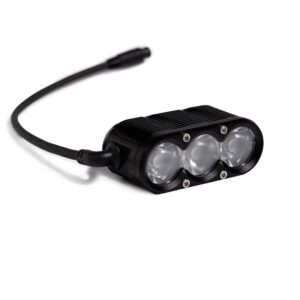
Gloworm XSV Light System (G2.1)
NZD$569.00
Includes Bar Mount and Power Pack 10 (G2.1)
Gloworm XSV Light System (G2.1)
NZD$569.00
Includes Bar Mount and Power Pack 10 (G2.1)
Warranty & Shipping
24-Month Warranty
Covered by our comprehensive 24-month warranty on self-contained light systems and light heads
14-Day Return Policy
Return your product within 14 days from the delivery date for a full refund. Your return window starts when you receive your light, not when you place your order.
Fast International Delivery
All orders ship from our international distributors for faster delivery to your region.
Free Worldwide Shipping
Free worldwide shipping on orders over $140 USD ($85 NZD for New Zealand)
No Import Fees
No import fees or customs charges for US, EU, NZ & AU orders
What's in the Box
Technical
Specifications


Optic Upgrade Packages: Sold separately
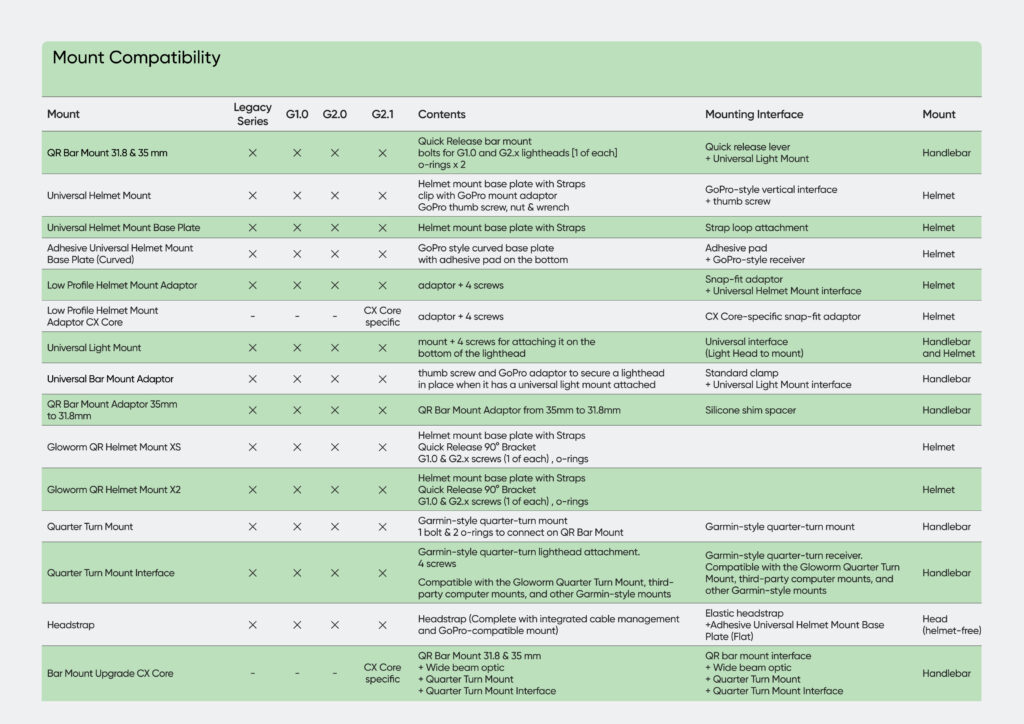
QR Bar Mount 31.8 & 35 mm & Universal Light Mount (included)
Helmet Mount:
Universal Helmet Mount & Low Profile Helmet Mount Adaptor (sold separately)
USB-PD Charger 45W: 3hr 30min
USB-PD Charger 20W: 5hr 15min
Power Pack 10 (G2.x): 360 grams
Power Pack 10 (G2.x): 85 x 50 x 31mm (LxWxH)
Technical
Specifications
Optic Upgrade Packages: Sold separately
QR Bar Mount 31.8 & 35 mm & Universal Light Mount (included)
Helmet Mount:
Universal Helmet Mount & Low Profile Helmet Mount Adaptor (sold separately)
USB-PD Charger 45W: 3hr 30min
USB-PD Charger 20W: 5hr 15min
Power Pack 10 (G2.x): 360 grams
Power Pack 10 (G2.x): 85 x 50 x 31mm (LxWxH)
Technical
Specifications
Optic Upgrade Packages: Sold separately
QR Bar Mount 31.8 & 35 mm & Universal Light Mount (included)
Helmet Mount:
Universal Helmet Mount & Low Profile Helmet Mount Adaptor (sold separately)
USB-PD Charger 45W: 3hr 30min
USB-PD Charger 20W: 5hr 15min
Power Pack 10 (G2.x): 360 grams
Power Pack 10 (G2.x): 85 x 50 x 31mm (LxWxH)
Product FAQS
Are Gloworm Lights waterproof?
X-Series G1.0 and G2.x lights are rated IP67 (submersible but not recommended).
CX Series is rated IP65 (dust tight and suitable for rainy conditions).
Do I need to use the Gloworm Link App to operate my light?
While technically not a requirement, the Gloworm Link App allows you to create/adjust custom light levels, update firmware (we are constantly updating firmware to better manage battery life, temp management, light output and other processes), and monitor battery levels/health.
You can totally use your Gloworm Light without ever pairing it with the Glowom Link App, but you won’t be using it to its fullest potential.
How do I adjust my light’s output and runtime with the Gloworm Link App?
To customize the light output levels of your Gloworm Light within the Gloworm Link App, you must create a new “Custom Light Profile” (the factory Default Light Profile cannot be adjusted).
To do this, select the Light in the App’s Device Screen, and click on “Create Your Light Profile (Default)”, next click “New Profile” and name the New Profile anything you want, and click “OK”
You now have a new custom light profile with 3 Fixed Light Levels and one “Special Mode” level. You can add a 4th level by clicking the + sign at the bottom right of the Saved Profiles screen. You may adjust output of all the custom light levels to any point 1-100%.
Special Mode allows you to choose from one of three Flashing Modes or a Dim Mode(1%)” You can create as many custom light profiles as you like and adjust the output levels to meet the needs of that profile.
How do I pair my light with the Gloworm Link App?
To pair your G2.x* light with the Gloworm Link App, you must first place the light in “pairing mode”.
Depending on which light series you’re pairing (X-Series or CX Series) this can be accomplished in one of two ways.
X-Series: With the light and battery connected and the light powered off, press and hold the power switch on the light head until the OLED on the power pack reads “PHONE”. At that point, open the app, click the + sign and follow the on-screen prompts to select your light from the device list and begin the pairing process.
CX-Series: With the light powered off, press and hold the power switch on the light for approximately 15 seconds, until it begins to flash BLUE. At that point, open the app, click the + sign and follow the on-screen prompts to select your light from the device list and begin the pairing process.
*G1.0 Lights and batteries are not compatible with Gloworm Link
How do I pair multiple Gloworm Lights to a single TX remote?
To pair multiple Gloworm Lights to a single TX Remote, simply follow the steps for Single Button Mode or Dual Button Mode for each light you’d like to pair with the remote.
Single Button Mode (Separate Control): To control multiple lights individually simply pair each light in Single Button Mode to a specific button – one light to Button A, and a second light to Button B. This is helpful when controlling both a helmet light and handlebar light separately with a single remote. In this instance you will scroll thru light levels* on each light, separate from the other, using the specific button assigned to each light.
Dual Button Mode (Synchronized Control): To control multiple lights in sync with each other simply pair each light in Dual Button Mode on a single remote. Both lights will be paired to Button A and to Button B. In this instance, as you click up with Button A, both lights will increase their output, and as you click down with Button B, both lights will decrease their output*.
* It is worth noting here, you can “tune” the output of each light’s levels using the Gloworm Link App, and when controlling multiple lights, either separately or in sync, this allows you to prevent one light washing out the other as you click thru the light levels.
How do I pair my TX Remote with my light?
You can pair your TX Remote in one of two different configurations depending on how you want to use it: Single Button Mode or Dual Button Mode
Single Button Mode This will pair a single remote button (Button A) with your light(s) and allow you to scroll up thru all the light levels until it reaches the highest level and then return to the lowest light level. Just like with the Gloworm Link App, to pair your light(s) with the Gloworm TX Remote, you must first place the light in “pairing mode” Depending on which light series (X-Series or CX-Series) this can be accomplished in one of two ways.
X-Series: When you first connect your light to Power Pack, the OLED display will show “Pair TX” for approximately ~ 15 seconds. During this 15 second pairing window, simply click and release one of the buttons on the remote, and the light will flash once to indicate it is paired to that button (Button A)
CX-Series: The first time* you pair the remote to the light you will follow the same steps as pairing CX with the Gloworm Link App – press and hold the power switch on the light for approximately 15 seconds, until it begins to flash BLUE, next click and release one of the buttons on the remote, and the light will flash once to indicate it is paired to that button (Button A)
* It is important to note, once CX has been paired to a specific remote you do not need to go thru the entire pairing process again to reconnect, unless the battery has been depleted to 0% or the firmware version has been updated. Simply power on the light on using the light head’s power switch and click the remote. The light will flash and the remote is re-paired.
Dual Button Mode Once your light is paired in Single Button Mode, you can then pair the remote in Dual Button Mode (Button A and Button B) to allow you to click up and down the light levels using Button A to go up, and Button B to go down.
X-Series & CX Series: With the remote paired in Single Button Mode, and the light powered on, press and hold Button A, and at the same time double-click Button B. The light will flash once and it is now paired in Dual Button Mode.
Mount Compatibility
Recommended Accessories

Gloworm Optic Upgrade Package (6 Optics) (G2.x) – Gloworm XSV Optic Upgrade Package (6 Optics) (G2.x)
NZD$34.00
Gloworm Optic Upgrade Package (6 Optics) (G2.x) – Gloworm XSV Optic Upgrade Package (6 Optics) (G2.x)
NZD$34.00

Gloworm USB-PD Fast Charger (G2.x)
Price range: NZD$32.00 through NZD$53.00
Gloworm USB-PD Fast Charger (G2.x)
Price range: NZD$32.00 through NZD$53.00
Gloworm Optic Upgrade Package (6 Optics) (G2.x) – Gloworm XSV Optic Upgrade Package (6 Optics) (G2.x)
NZD$34.00
Gloworm USB-PD Fast Charger (G2.x)
Price range: NZD$32.00 through NZD$53.00


New Zealand
Engineered

Intelligent
Manufacturing

Outstanding
Customer Support

Community-Driven
Innovation
In stock
NZD$569.00
In stock
NZD$569.00
In stock
In stock