


Support
We’re riders too, so we know how much a working Light System matters. Find quick answers in the FAQs below, or download the User Guide for your Light System. Still stuck? Get in touch and our team will help you get back on the trail.
FAQs
Products
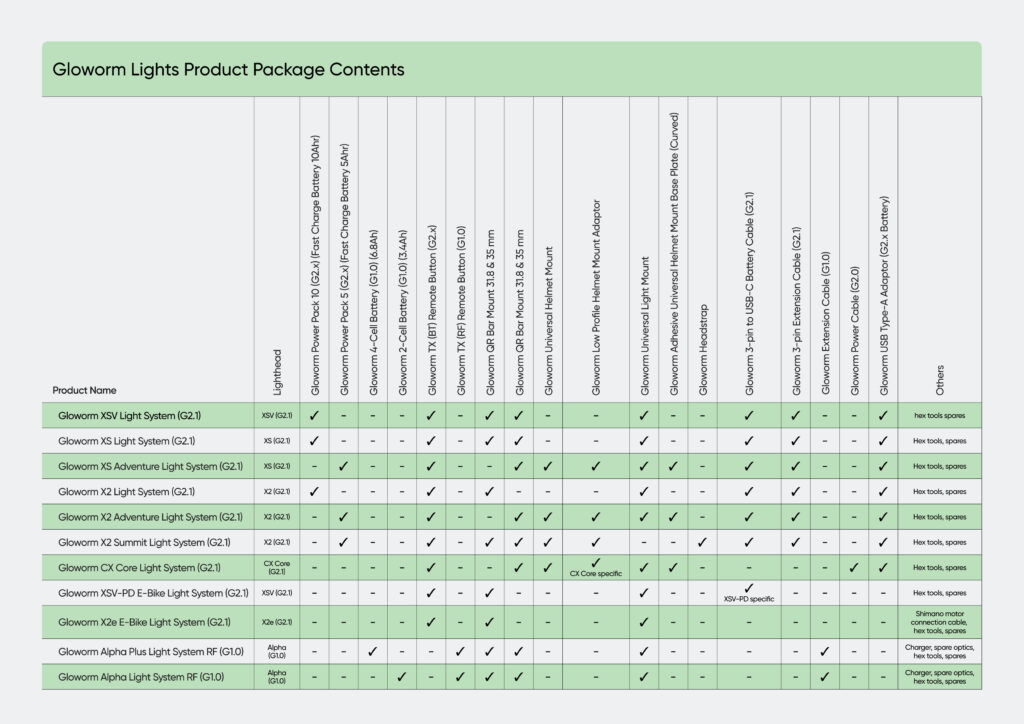
See the table below for what comes in the box with each Light System.
Absolutely. Whether you’re riding, running, caving or adventure racing, Gloworm Lights are built for it. Add the Gloworm Headstrap to wear your light without a helmet.
Yes. All Gloworm Light Systems are rated IP67: protected against dust and temporary immersion in water, although we don’t recommend submerging them.
Our current Gloworm Lights are designed for off-road riding. They’re not certified under road lighting regulations such as Germany’s StVZO, so please check the rules where you ride before using them on public roads.
Good news for road riders: a StVZO-approved Gloworm light is in development. Sign up to our newsletter to hear about it first.
G2.x Light Systems come with the cables you need, but not a charger. Your Power Pack (G2.x) and CX Core charge with any USB-C PD charger rated 20W or more. For the fastest charge, use a 45W USB-C PD charger such as the Gloworm USB-PD Fast Charger (G2.x) 45W, sold separately.
G1.0 Light Systems include the Gloworm Smart Charger (G1.0).
Gloworm Lights uses CREE LEDs. We currently use the XHP35.2, XML2 and XPG3 LEDs.
The LEDs have an almost unlimited life expectancy, losing only about 10% of their brightness after 2 years of continuous use (about 17,500 hours).
User Guides
Every new Gloworm Light System comes with a Quick Start Guide that has a QR code linking to the full User Guide. You can also download the User Guides here:
Gloworm Lights X Series Light Systems (G2.1) User Guide (XSV, XS and X2, including Adventure and Summit)
Gloworm Lights CX Core Light System (G2.1) User Guide
Gloworm Lights XSV-PD E-Bike Light System (G2.1) User Guide
Gloworm Lights X2e E-Bike Light System (G2.1) User Guide
Looking for instructions for an older light? Contact Us and we’ll help.
Power Packs
Lithium-ion batteries are sensitive to voltage imbalance. If a battery is left at a low charge for a long time, or runs completely flat (0%), its cells can become unbalanced. As a safety precaution, the Battery Management System (BMS) then stops it charging from a fast charger, such as the Gloworm 20W and 45W Fast Chargers, until the imbalance is resolved.
To fix this, connect the battery to a low-power charger (about 3-5W) until it’s charged above 25%. An old phone charger, or the USB-A port on a laptop or power strip with a USB-A to USB-C cable, works well. After that, it’s safe to go back to your Gloworm Fast Charger.
Signs of voltage imbalance:
- Power Pack (G2.x): when connected to a fast charger, the OLED wakes up and shows the fuel gauge icon without the flashing charge indicator, then goes to sleep.
- CX Core: the Power Switch flashes red/white, or in extreme cases doesn’t light up at all.
- G1.0 batteries: the LED fuel gauge doesn’t light up or doesn’t flash to show charging. G1.0 batteries aren’t fast-charge capable, so simply leave the battery connected to your Gloworm Smart Charger (G1.0) for an hour or two and it should start charging again.
Disconnect the battery from your light, charge it to about 70% and keep it somewhere cool and dry, ideally below 15°C. An airtight container in the fridge works well. Avoid storing a fully charged battery at 30°C or more, or in direct sunlight.
If you’re storing it for longer than 3 months, check the charge level regularly and top it up to about 70%.
It’s best not to fully drain your Power Pack or battery before recharging. Lithium-ion batteries wear much more slowly with small, frequent top-ups than with full charges. For example, using some capacity and topping back up causes far less wear than running it flat and charging it to 100%.
You can expect at least 2-3 years of regular use before you notice a drop in capacity and runtime. That’s usually about 500 full charge cycles before capacity falls below 80% of the original.
Yes. The light uses a small amount of power to keep the TX (BT) Remote connection. To prevent this, disconnect the battery from the light when you’re not using it. If your battery still loses charge when it’s disconnected, make sure its firmware is up to date.
Yes. Your Power Pack’s firmware is designed to work below freezing. Extreme cold (and heat) can temporarily reduce capacity and runtime, but you can usually reduce the effect by keeping the battery insulated inside your jersey or pack while you ride.
The firmware can take a few full charge cycles to ‘learn’ the capacity of its cells. Cycle the battery through a few full charges/discharges and the runtime should more accurately reflect advertised runtimes.
Yes, all Gloworm Power Packs can charge or power other devices. USB-PD compatible devices receive up to 20W; other devices receive 5W.
- Power Pack (G2.0): use the Gloworm USB-C to USB-C Adaptor.
- Power Pack (G2.x): use the Gloworm 3-pin to USB-C Battery Cable (G2.1).
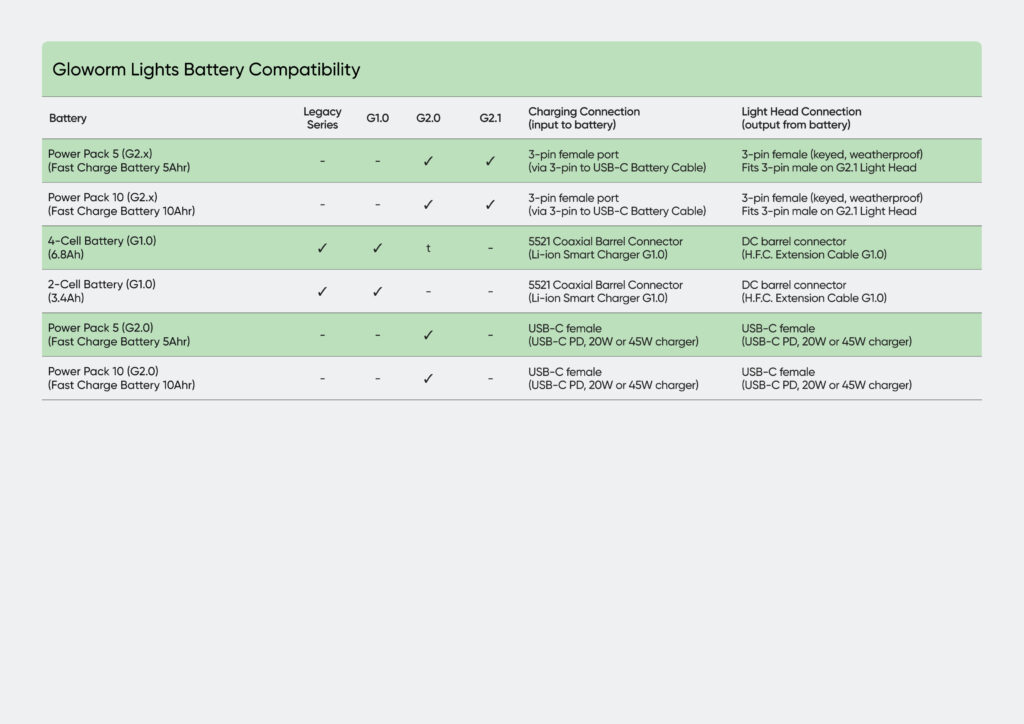
Use the table below to check which batteries work with each generation and how they connect.
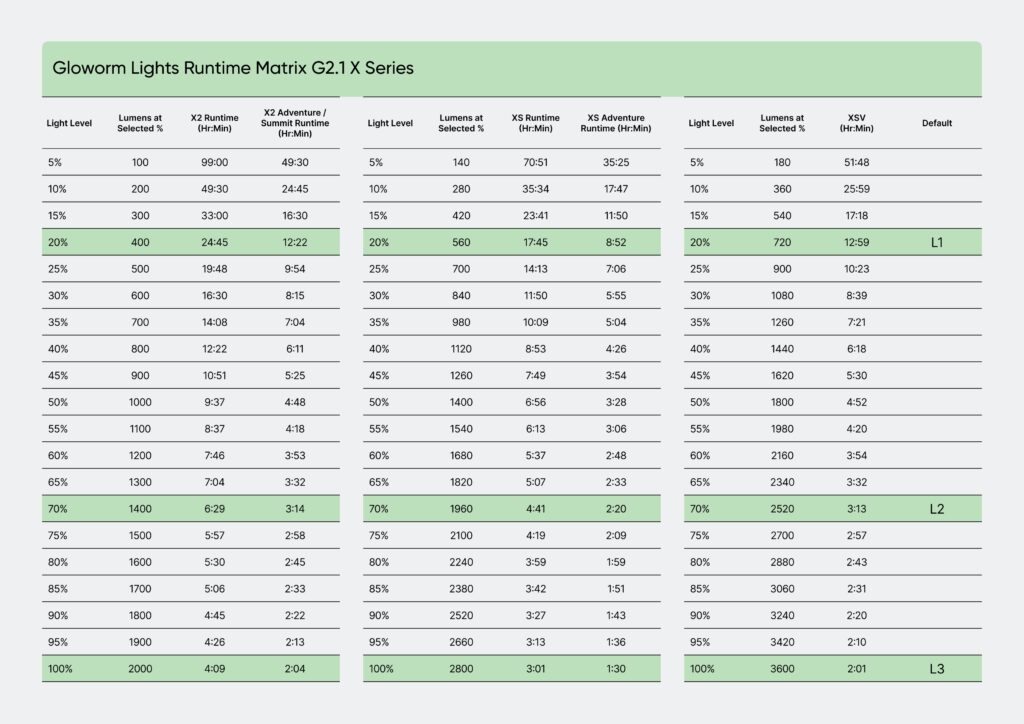
Runtime depends on the brightness you choose. The table below shows the runtime at each setting for the XSV, XS and X2 (with Power Pack 10 (G2.x)) and for the XS Adventure, X2 Adventure and X2 Summit (with Power Pack 5 (G2.x)). L1, L2 and L3 mark the default light levels. Very cold temperatures can reduce runtime.
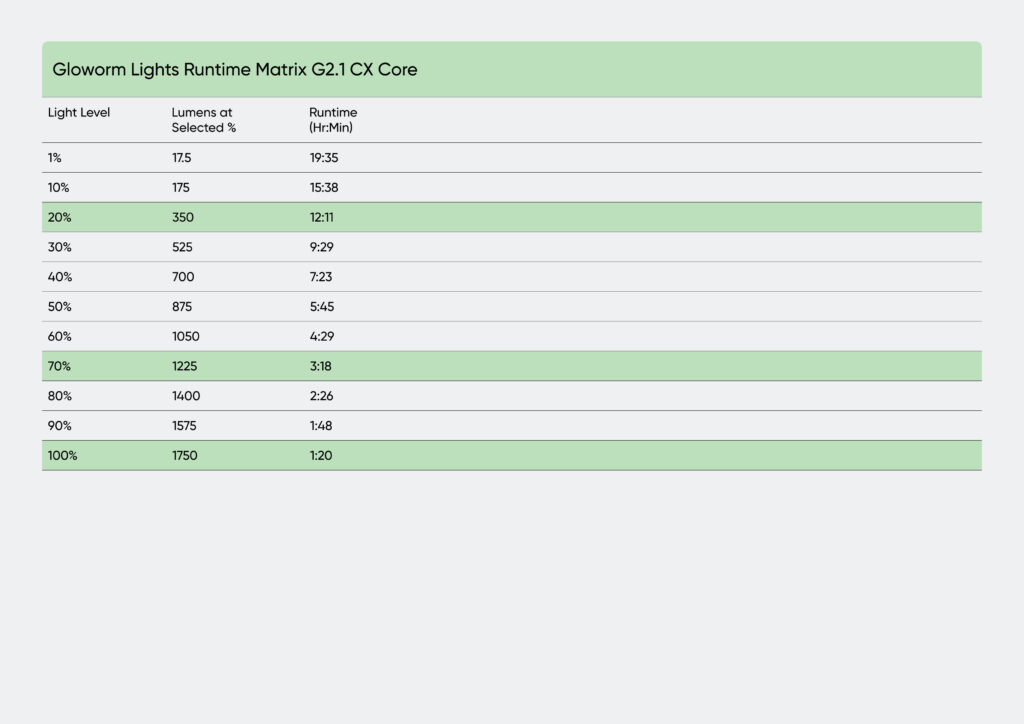
The table below shows the CX Core’s runtime and output at each brightness setting. Want more runtime? Connect a Power Pack (G2.x) for up to 4 more hours at maximum power.
In most cases yes, but rules vary between airlines, so please check with yours before you fly. Airlines rate batteries in watt-hours (Wh), and most allow lithium-ion batteries of 100Wh or less without special approval. Spare batteries usually have to go in your cabin baggage, not checked luggage.
All Gloworm batteries are under 100Wh:
- Power Pack 10 (G2.x): 74Wh
- Power Pack 5 (G2.x): 37Wh
- CX Core (G2.1) built-in battery: 21.6Wh
- 4-Cell Battery (G1.0): 50Wh
- 2-Cell Battery (G1.0): 25Wh
Yes. CX Core supports pass-through charging. Connect a Power Pack 5 (G2.x) or Power Pack 10 (G2.x) while you ride, using the 3-pin to USB-C Battery Cable (G2.1), to add up to 4 hours at maximum power.
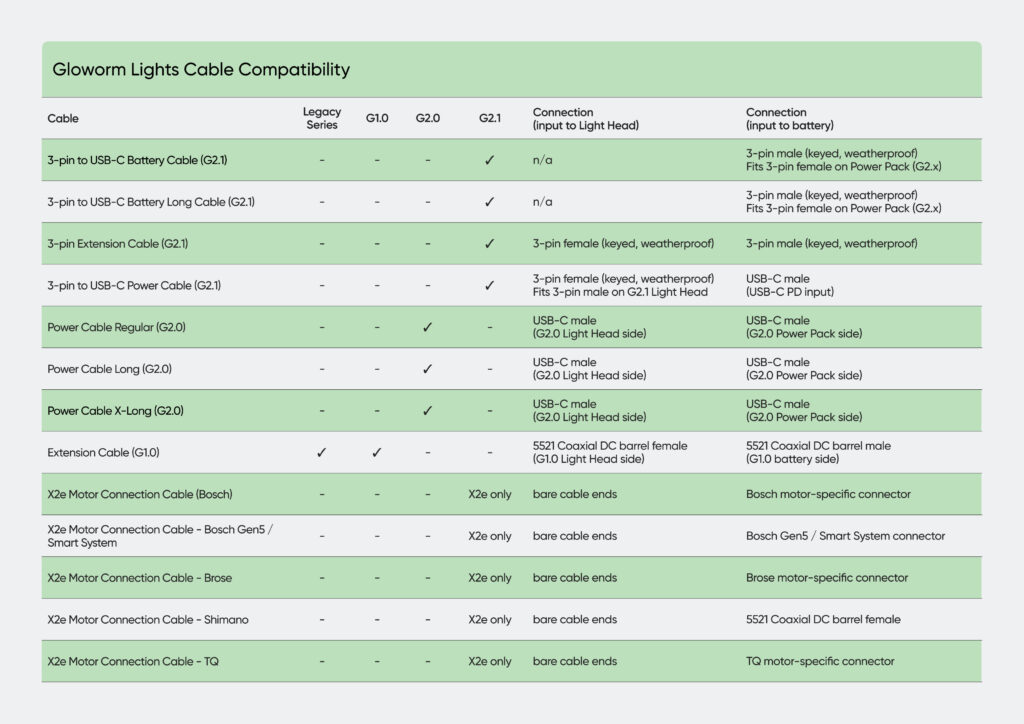
Use the table below to find the right cable for your Light System and battery.
Mounts & Optics
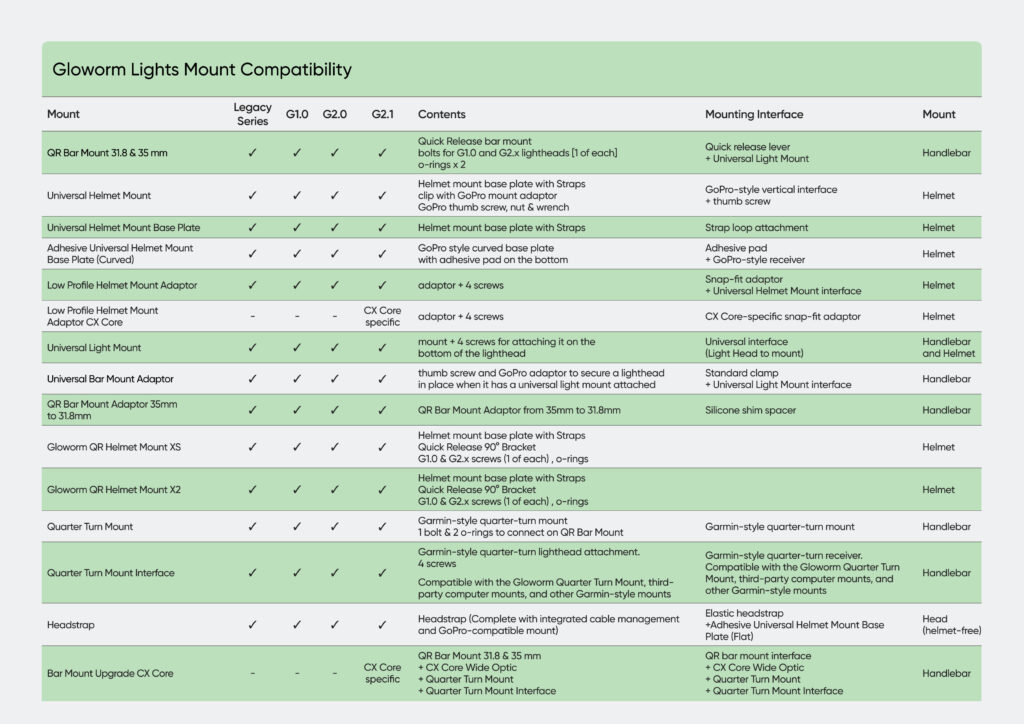
Almost all Gloworm Lights mounts work across every generation of our Light Systems; a few parts are CX Core-specific. Use the table below to check what fits your light and what’s included with each mount.
It depends on where you want to run your light:
- Helmet: the Low Profile Helmet Mount Adaptor keeps the light close to your helmet for a clean, low setup. The Universal Helmet Mount uses an action camera-style mount. Both fit the Universal Helmet Mount Base Plate, and the Adhesive Universal Helmet Mount Base Plate (Curved) sticks to smooth or vented helmets, no holes needed.
- Handlebars: the QR Bar Mount 31.8 & 35 mm gives a stable, tool-free quick-release connection and fits 31.8mm and 35mm bars.
- Switching between bike and helmet: the Quarter Turn Mount and Quarter Turn Mount Interface give you a tool-free twist-and-lock connection, so you can swap between setups in seconds. The interface also fits most bike computer mounts.
- Action camera-style mounts: the Universal Light Mount attaches to the 4-bolt pattern on the underside of the Light Head.
CX Core comes with the Universal Helmet Mount, Low Profile Helmet Mount Adaptor CX Core, Adhesive Universal Helmet Mount Base Plate (Curved) and Universal Light Mount. To run it on your handlebars, the Bar Mount Upgrade CX Core adds the QR Bar Mount 31.8 & 35 mm, Quarter Turn Mount, Quarter Turn Mount Interface and CX Core Wide Optic.
Swap optics to change your beam for the trail ahead:
- Spot (96% efficient, 17°): the narrowest, most efficient beam, for the greatest output and distance. Great on the helmet to see far down the trail or spot the exit of a turn.
- Wide (87% efficient, 40°): a wide rectangular beam with more peripheral light. Pair it with a Spot for an effective hybrid beam.
- Honeycomb (87% efficient, 30°): designed for the XSV, it smooths the beam and gives an even transition from the bright centre when used with 2 Spot optics.
CX Core comes with the Standard Optic, optimised for helmet use. The CX Core Wide Optic (sold separately, or in the Bar Mount Upgrade CX Core) is optimised for handlebar use.
E-Bike Light Systems
Yes. We make two dedicated E-Bike Light Systems, the X2e and the XSV-PD, and you can also run our XSV, XS and X2 Light Systems from any e-bike with a USB-C PD output port. The table below shows which option suits your bike.
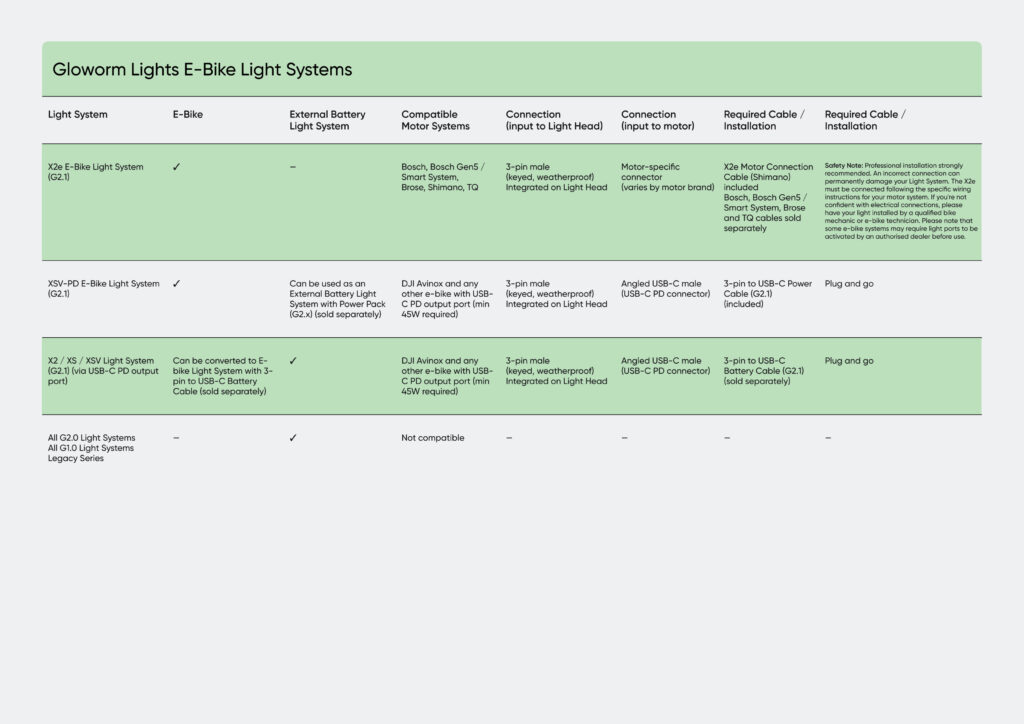
We strongly recommend having the X2e installed by a qualified bike mechanic or e-bike technician. It connects directly to your motor’s light port, and an incorrect connection can permanently damage your Light System. Some e-bike systems also need the light port activated by an authorised dealer first.
For full installation steps, see the Gloworm X2e E-Bike Light System (G2.1) User Guide.
The X2e E-Bike Light System (G2.1) includes a Shimano motor connection cable as standard. Connection cables for Bosch, Bosch Gen5/Smart System, Brose and TQ motor systems are available separately.
Connect the XSV-PD to your e-bike’s USB-C PD outlet with the 3-pin to USB-C Power Cable (G2.1). Your bike needs a USB-C PD output of at least 45W, so check your bike is compatible first (see “Is the XSV-PD compatible with my DJI Avinox e-bike?”).
Please follow your e-bike manufacturer’s instructions when using the USB-C port.
For step-by-step instructions, see the XSV-PD E-Bike Light System (G2.1) User Guide [LINK: User Guide FAQ]
The XSV-PD needs a high-output USB-C PD port, which not every Avinox system has. Check your motor:
- Compatible: Avinox M1, and Avinox M2S motor with the DP100 control panel (65W USB-C PD port)
- Not compatible: Avinox M2 motor with the DPC100 control panel (10W USB output only)
Some bike brands spec different combinations of Avinox motors and control panels, so the safest rule of thumb is your motor type: if your bike has the M1 or M2S motor, the XSV-PD will work.
Not sure which motor your bike has? Check your bike’s spec sheet or ask your dealer, or Contact Us and we’ll help.
Yes. Connect it to a Power Pack 5 (G2.x) or Power Pack 10 (G2.x), sold separately, with the 3-pin to USB-C Battery Cable (G2.1), and it works as a standard external battery Light System.
TX Remote Button
You can pair your TX (BT) Remote in two ways:
- Single Button Mode: one button steps up through the light levels and then back to the lowest level.
- Dual Button Mode: one button steps up and the other steps down.
The pairing steps depend on your light, so follow the instructions in your User Guide [LINK: User Guide FAQ].
Follow the steps for Single Button Mode or Dual Button Mode for each light you’d like to pair. You can pair the lights at the same time or one at a time.
Single Button Mode (separate control): pair each light to its own button, for example your helmet light to Button A and your handlebar light to Button B. Each button then steps through the light levels* of its own light.
Dual Button Mode (synchronised control): pair each light in Dual Button Mode on the same remote. Both lights are paired to Button A and Button B, so when you click up with Button A both lights get brighter, and when you click down with Button B both lights dim*.
*You can fine-tune each light’s levels in the Gloworm Link App. When you run two lights, separately or in sync, this stops one light washing out the other as you click through the levels.
Yes. The TX (BT) Remote uses a CR2032 coin cell battery, which you can replace yourself. See your User Guide for the steps [LINK: User Guide FAQ].
The original TX (RF) Remote (G1.0) has black buttons. The newer TX (BT) Remote (G2.x) has grey buttons. They aren’t interchangeable.
To save battery, the TX (BT) Remote disconnects after a period of inactivity. With the latest firmware update:
XSV, XS and X2 stay connected to the remote for up to 18 hours when not in use, as long as the Power Pack and Light Head stay connected. To reconnect, disconnect the Light Head from the Power Pack, reconnect it and pair the remote again.
CX Core stays connected to the remote for up to 60 minutes when not in use. To reconnect, power on the light with its Power Switch and click the remote once. The light flashes once to show it’s paired again.
Gloworm Link App
Download the Gloworm Link App (App Store / Google Play), turn on your phone’s Bluetooth and put your G2.x* light in pairing mode. Then open the app, tap the + symbol and follow the on-screen prompts.
How you put your light in pairing mode depends on your light, so check your User Guide for the steps [LINK: User Guide FAQ].
*G1.0 lights and batteries aren’t compatible with the Gloworm Link App.
With your light paired, open the Device Screen in the Gloworm Link App. The app will prompt you when a new firmware version is available, or you can tap “Check for Device Updates”. Then follow the prompts on the screen.
For full steps, see your User Guide [LINK: User Guide FAQ].
Create a Custom Light Profile in the Gloworm Link App to set your own light levels (anywhere from 1-100%) and choose a Special Mode, such as a flashing mode or Dim Mode. The factory Default Light Profile can’t be adjusted, and you can create as many Custom Light Profiles as you like.
For full steps, see your User Guide [LINK: User Guide FAQ].
No, but you’ll get much more from your light with it. The Gloworm Link App lets you create and adjust custom light levels, update firmware (we regularly release updates that improve battery life, temperature management, light output and more) and check your battery level and health.
You can use your Gloworm Light without ever pairing it with the app, but you won’t be using it to its full potential. Download it free from the App Store or Google Play.
Make sure you have the latest version of the Gloworm Link App installed, and that Bluetooth and location services are turned on. Sometimes you’ll need to repeat the pairing process. If you still have issues, remove the light from your phone’s Bluetooth settings and restart your phone.
This can happen from time to time, usually because of Bluetooth interference. Remove your Gloworm Light from both the Gloworm Link App and your phone’s Bluetooth settings, restart your phone and the app, then follow the normal pairing or updating process again.
It can be unsettling to see your Power Pack stuck on UPDATE, but it’s easy to fix.
Unplug the Power Pack from the light and restart the app on the paired devices screen. Keep the Device Screen open, with your phone and Power Pack close together. Within a few minutes the app will restart the update and it should finish normally. Make sure location services are on and the Gloworm Link App has permission to use your location.
Unfortunately not. G1.0 lights aren’t designed to work with the Gloworm Link App.
The Gloworm Link App is free for iOS and Android:
It works with all G2.x Light Systems and Power Packs (G2.0 and G2.1). G1.0 lights aren’t compatible.
Tap the battery icon on the Paired Device screen to see:
- Battery life (%)
- Battery diagnostics information
- Battery voltage
- Current
Orders & Payments
Payment options depend on where you’re ordering from:
- All regions: Visa, Mastercard, American Express, Discover, Apple Pay, Google Pay, Link (by Stripe), PayPal and PayPal Pay Later*
- New Zealand: also Afterpay
- USA: also Klarna, Venmo and Cash App Pay
- European Union: also SEPA Direct Debit, plus iDEAL in the Netherlands
*PayPal decides whether to offer Pay Later based on the country your PayPal account is registered in, so you’ll only see it at checkout if it’s available for your PayPal account.
All payments are processed securely through Stripe and PayPal.
You can order directly from our online store at glowormlights.com, which ships from the Gloworm Lights warehouse in your region, or visit a Gloworm Lights retailer near you. Find bike shops and online stores that stock Gloworm Lights on our store locator.
No. During our sale campaigns, discount codes and coupons can’t be used, because our sale prices are already our best offer. Once the sale ends, you can use your code again, as long as it hasn’t expired.
Please Contact Us as soon as possible. We process orders within 1-2 business days, so if your order hasn’t shipped yet we’ll do our best to change or cancel it. Once it’s on its way, you can return it under our Return & Refund Policy.
Shipping & Delivery
We hold stock in five warehouses around the world, so your order ships from the one closest to you. That means faster delivery and, in most regions, no customs charges on arrival.
- New Zealand: orders to New Zealand
- Australia (Brisbane): orders to Australia
- United States: orders to the USA and Canada
- European Union (Greece): orders to the EU and the rest of Europe
- United Kingdom (Nottingham): lights and batteries to the UK. Accessories ships on their own ship from our EU warehouse.
For delivery times and costs, see our Shipping & Payment.
Yes. Orders over these amounts ship free:
- New Zealand: $89 NZD
- Australia: $199 AUD
- USA: $140 USD
- Canada: $229 CAD
- European Union: €119
- United Kingdom: £99
- Rest of Europe: €179
See our Shipping & Payment for full details.
We ship to:
- New Zealand
- Australia
- USA
- Canada
- European Union: all 27 member states
- United Kingdom
- Rest of Europe: Switzerland, Norway, Iceland, Liechtenstein, Albania, Serbia, Bosnia and Herzegovina, North Macedonia, Turkey, Monaco, San Marino and Vatican City
If you’re an existing Gloworm Lights customer somewhere not listed and need service or replacement parts, please Contact Us.
It depends on where you’re ordering from:
New Zealand, Australia, USA, European Union and United Kingdom: no. Your order ships from our local warehouse, so there are no import duties or customs charges to pay on delivery. In the UK, lights and batteries ship from our UK warehouse. Accessories ordered on their own ship from our EU warehouse in Greece; these are low-value parcels that don’t normally attract import charges.
Canada: your order ships from our US warehouse, so Canadian sales tax (GST, HST or PST, depending on your province) is charged when your parcel arrives in Canada. You pay it on delivery, together with Canada Post’s CAN$9.95 handling fee. There’s no brokerage fee, and bike lights are generally duty-free into Canada, so there’s no import duty on top. The table below shows the rate for your province and what it comes to on a typical order.
[TABLE: Canadian sales tax by province]
Rest of Europe (Switzerland, Norway, Iceland, Liechtenstein, Albania, Serbia, Bosnia and Herzegovina, North Macedonia, Turkey, Monaco, San Marino and Vatican City): your order ships from our EU warehouse, so local import duties, taxes and carrier clearance fees may apply. These are paid by the recipient to the carrier on delivery.
For more, see our Shipping & Payment.
We process orders within 1-2 business days. After that, estimated delivery times are:
- New Zealand: 1-3 business days (NZ Post)
- Australia: 1-3 business days (Australia Post)
- USA: 2-5 business days (UPS or USPS)
- Canada: 3-10 business days (USPS, delivered by Canada Post)
- European Union: 1-5 business days (DHL or Hellenic Post)
- United Kingdom: 1-3 business days (Royal Mail)
- Rest of Europe: 3-7 business days (DHL or Hellenic Post)
UK accessories are shipped separately from our EU warehouse and may take a little longer.
For more, see our Shipping & Payment.
If your order is under the free shipping amount, we charge a flat rate based on where you are:
- New Zealand: $7.90 NZD ($12.90 NZD rural)
- Australia: $14.90 AUD
- USA: $9.90 USD
- Canada: $19.90 CAD
- European Union: €14.90 (Greece: €7.90)
- United Kingdom: £10.90
- Rest of Europe: €19.90
See our Shipping & Payment for full details.
Once your order ships, we’ll email you a tracking number so you can follow your delivery with the carrier.
Return & Refund
You can return your Light System, Power Pack and/or accessories within 30 days of purchase for a full refund, minus shipping, as long as they’re in “New and Unused Condition” and in their original, undamaged packaging.
“New and Unused Condition” means your items come back to us in the same condition you received them, in their original packaging, with the manufacturer’s labels intact where possible. In other words, if you’ve taken your Light System for a ride or no longer have the packaging, it’s no longer New and Unused.
To arrange a return, request a Return Authorisation via our Product Support Form. Once we’ve received and inspected your return, we’ll refund you within 7 business days.
Read the full Return & Refund Policy
Sure, not a problem. We can exchange your Light System or Power Pack using the same Return Authorisation process and New and Unused Condition criteria as above.
Return shipping for exchanges is at the customer’s expense.
Warranty
We don’t generally offer a repair or refurbishment service.
However, depending on where you live, we may work with authorised repair partners who offer limited repairs.
Please Contact Us for more information.
All Gloworm Light Heads and G2.x batteries are covered for 24 months, and G1.0 and G2.0 batteries and all accessories for 12 months from the date of purchase, against defects in materials and workmanship. This includes battery capacity falling below 80% of the original within 500 charge cycles or the warranty period, whichever comes first.
If your product has a warranty issue, we’ll repair or replace it at our discretion and return it to you at no charge for parts or labour.
The warranty doesn’t cover crash or impact damage (see Crash Replacement Policy), misuse, modifications, unauthorised repairs, freight damage, second-hand products, products from non-authorised dealers, cosmetic wear or normal wear and tear.
Read our full Warranty & Crash Replacement Policy.
Request a warranty evaluation via our Product Support Form and include:
- Proof of purchase or your registered serial number
- Photos or a video of the issue
- A description of the problem and when it started
- Your shipping address and contact details
We’ll get back to you within 7 business days of receiving your completed request.
Yes. Crashes happen, so we offer Crash Replacement for lights damaged beyond repair in a crash:
- Within 24 months of purchase: a full replacement at no cost
- After 24 months: a replacement at 40% off the Recommended Retail Price (RRP)
Submit your claim via our Product Support Form within 30 days of the crash, choose the “Crash Replacement” option and include your proof of purchase, photos (and video if you have it) and the full story of what happened. It helps us build tougher lights when we know what it takes to destroy them.
You can make up to 2 Crash Replacement claims in any 12 months. Read the Crash Replacement section of our Warranty & Crash Replacement Policy.
Please come to us directly. We handle all warranty claims in house, wherever you bought your light. Send us a request via our Product Support Form with your proof of purchase, and we’ll take it from there.